Nakshatra
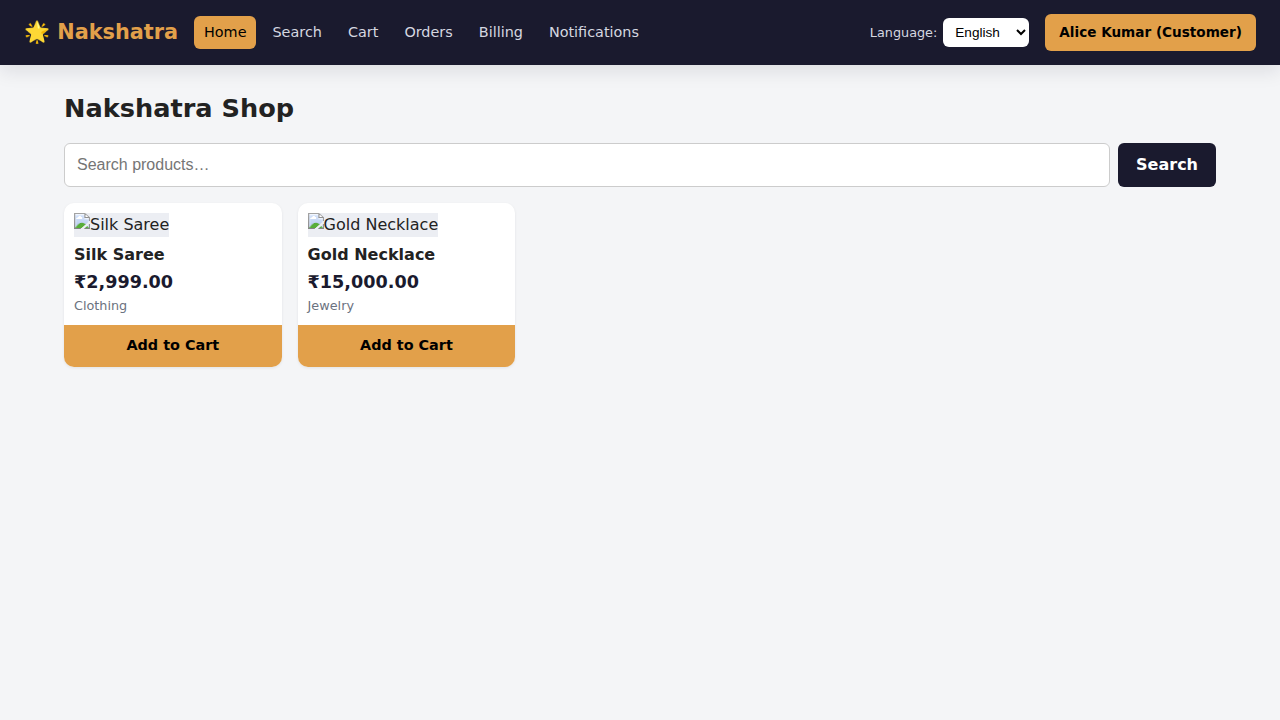
Nakshatra is an online shopping platform: a .NET 10 microservice backend behind a single API gateway, plus a React + TypeScript portal for customers, vendors, admins and fulfillment agents.
🌐 Live portal: https://charles2ke.github.io/Nakshatra/ — the React portal published to
GitHub Pages by .github/workflows/pages.yml. It is the frontend
only; set the VITE_API_BASE_URL repository variable to a reachable gateway for live data.
📐 Architecture & system design — diagrams, service catalog, event flows and design trade-offs.
Contents: Quick start · At a glance · Repository layout · What each persona can do · Run the full stack · Run pieces individually · Tests and linting · Configuration · External integrations · Troubleshooting · Deploying to Kubernetes · Deploying the portal to GitHub Pages
Quick start
| I want to… | Run this | Then open |
|---|---|---|
| See the portal only (no backend) | cd frontend && npm install && npm run dev |
http://localhost:5173 |
| Run everything (services, Mongo, Redis, Kafka) | docker compose up --build |
http://localhost:8080 |
| Hack on one service | dotnet run --project backend/src/Nakshatra.Catalog.Service |
http://localhost:5003 |
The portal ships with a persona switcher in the header — pick a user to see the navigation and pages available to customers, vendors, admins or fulfillment agents.
At a glance
flowchart LR
    U([Customers, vendors,<br/>admins, agents]) --> P[React portal]
    P -->|/api/*| G[API gateway<br/>YARP]
    G --> S[14 domain services<br/>catalog, search, cart, order,<br/>payment, billing, fulfillment,<br/>inventory, supply chain, media,<br/>recommendation, notification,<br/>user, vendor]
    S --> M[(MongoDB)]
    S --> R[(Redis)]
    S <--> K[(Kafka)]
- Synchronous reads go through the gateway to the owning service; services call each other over HTTP only for reads (for example search and cart read the catalog).
- Writes are integrated asynchronously: orders, payments, inventory, supply-chain and media events flow over Kafka, so fulfillment, billing, notifications and recommendations react without coupling to the producer.
- Mongo, Redis and Kafka are optional in development — services fall back to in-process implementations when they are not configured, so anything runs standalone.
Repository layout
| Path | Contents |
|---|---|
backend/src/Nakshatra.Gateway |
YARP reverse proxy, the only entry point for /api/* |
backend/src/Nakshatra.*.Service |
The 14 domain microservices (ASP.NET Core minimal APIs) |
backend/src/Nakshatra.Shared |
Shared models, storage, caching, messaging and ServiceDefaults |
backend/tests/Nakshatra.Tests |
Unit and endpoint tests |
frontend/ |
React + Vite portal, i18n (en/es/hi) and Playwright e2e tests |
infra/k8s/ |
Kubernetes manifests (namespace, config, one per service, portal + ingress) |
docs/architecture.md |
Architecture and system design documentation |
docker-compose.yml |
Full local stack: Mongo, Redis, Kafka, all services and the portal |
What each persona can do
The portal keeps one navigation shell and swaps the visible pages per persona
(frontend/src/components/Layout.tsx route guards):
| Persona | Pages available |
|---|---|
| Customer | Home, Search, Cart, Checkout, Orders, Billing, Notifications |
| Vendor | Home, Orders, Billing, Inventory & demand planning, Products setup, Notifications |
| Admin | Everything, including vendor and user setup |
| FulfillmentAgent | Home, Orders, Fulfillment board, Notifications |
Selecting a user from the header switcher stores the persona locally; picking Sign out clears it. Restricted routes render an “access restricted” message instead of failing.
Run the full stack
docker compose up --build
- Portal: http://localhost:8080
- Gateway: http://localhost:5000 (health check at
/health)
Run pieces individually
Backend (any service; the gateway expects services on ports 5001–5014):
dotnet build backend/Nakshatra.slnx
dotnet run --project backend/src/Nakshatra.Gateway
dotnet run --project backend/src/Nakshatra.Catalog.Service
Frontend (see frontend/README.md for details, including how to add a
locale):
cd frontend
npm install
npm run dev        # http://localhost:5173
VITE_API_BASE_URL points the portal at the gateway (default http://localhost:5000).
Tests and linting
dotnet test backend/Nakshatra.slnx        # backend unit + endpoint tests

cd frontend
npm run lint                              # oxlint
npm run build                             # type-check + production build
npx playwright install --with-deps chromium
npm run test:e2e                          # Playwright e2e, screenshots in e2e/screenshots
Configuration
Every service reads configuration from appsettings.json and environment variables:
| Setting | Purpose |
|---|---|
Mongo__ConnectionString, Mongo__Database |
Document store; omitted ⇒ in-memory repository |
Redis__ConnectionString |
Cache; omitted ⇒ in-memory cache |
Kafka__BootstrapServers |
Event bus; omitted ⇒ in-process event bus |
Cors__AllowedOrigins__N |
Origins allowed to call the API |
RateLimit__PermitsPerMinute |
Per-IP, per-replica request limit (default 600) |
ReverseProxy__Clusters__* |
Gateway routing targets |
Payments__Provider, Payments__Stripe__SecretKey |
Stripe integration; omitted ⇒ simulated gateway |
Notifications__Smtp__* |
SMTP email delivery; omitted ⇒ in-app feed only |
Notifications__Twilio__* |
Twilio SMS delivery; omitted ⇒ in-app feed only |
Notifications__Webhook__Url, __Token |
Outbound webhook delivery; omitted ⇒ in-app feed only |
External integrations
Third-party providers sit behind interfaces and are enabled by configuration, so the stack still runs end to end without any external accounts:
| Integration | Service | Enable with | Without it |
|---|---|---|---|
| Stripe (PaymentIntents, refunds) | Payment | PAYMENTS_PROVIDER=stripe STRIPE_SECRET_KEY=sk_... docker compose up |
Simulated card gateway |
| SMTP email | Notification | SMTP_HOST, SMTP_PORT, SMTP_USERNAME, SMTP_PASSWORD, SMTP_FROM_ADDRESS |
Notification stays in the in-app feed |
| Twilio SMS | Notification | TWILIO_ACCOUNT_SID, TWILIO_AUTH_TOKEN, TWILIO_FROM_NUMBER |
Notification stays in the in-app feed |
| Outbound webhook | Notification | NOTIFICATIONS_WEBHOOK_URL, NOTIFICATIONS_WEBHOOK_TOKEN |
Notification stays in the in-app feed |
With Stripe enabled the portal must tokenize the card with Stripe.js and send the resulting token
as paymentMethodToken; requests that still contain a card number are rejected so raw card data
never reaches the backend. See docs/architecture.md for the full
integration design.
Troubleshooting
| Symptom | Likely cause and fix |
|---|---|
| Portal loads but every list is empty | The gateway is not reachable. Check VITE_API_BASE_URL (default http://localhost:5000) and curl http://localhost:5000/health. |
| Navigation only shows Home | No user is selected — pick one from the persona switcher in the header. |
| A page says “access restricted” | The selected persona is not allowed on that route; switch to a persona from the table above. |
docker compose up fails on Kafka or Mongo |
Ports 9092/27017/6379 are already in use locally, or the machine is low on memory. Stop the conflicting services or run individual projects instead — Mongo, Redis and Kafka are optional. |
| Playwright fails with “browser not installed” | Run npx playwright install --with-deps chromium in frontend/. |
| Locale shows English text after switching | The key is missing from that catalog; the app falls back to en and logs a one-time console.warn with the key name. |
Deploying to Kubernetes
kubectl apply -f infra/k8s/
Manifests create the nakshatra namespace, a ConfigMap with all routing and backing-store
addresses, a Deployment plus ClusterIP Service per microservice, and the portal behind an
Ingress. Replace the placeholder Secret with a real secret store before any non-local use.
Deploying the portal to GitHub Pages
Every push to main builds the portal and publishes it to
https://charles2ke.github.io/Nakshatra/.
- The workflow sets Settings → Pages → Source to GitHub Actions on every run, so the
legacy branch-based build can no longer publish a rendered
README.mdinstead of the portal. If that API call is not permitted, the run logs a warning and the source must be set manually. BASE_PATHsets the Vite base so assets and routes resolve under/Nakshatra/.index.htmlis copied to404.htmlso client-side routes survive a reload.- Set the
VITE_API_BASE_URLrepository variable to point the published portal at a publicly reachable gateway; without it the portal falls back tohttp://localhost:5000.